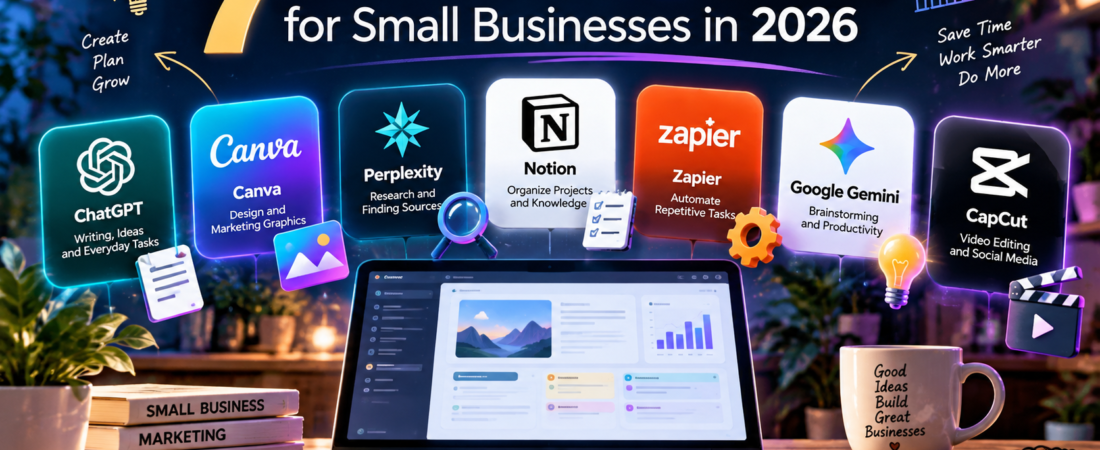
Running a small business often means juggling marketing, customer support, content creation, and daily operations with limited time and money. Fortunately, AI tools can help you work more efficiently without hiring a large team.
In this guide, we explore seven AI tools that offer free plans or free access options in 2026. We’ll look at what each tool does best, its limitations, and how small business owners can use it in their everyday workflows.
7 Best Free AI Tools for Small Businesses in 2026
1. ChatGPT — Best for Writing, Ideas, and Everyday Business Tasks
Best for: Small business owners who need help with marketing, customer communication, brainstorming, and content creation.
ChatGPT is a versatile AI assistant that can help small businesses save time on everyday tasks. You can use it to draft professional emails, brainstorm social media campaigns, write product descriptions, organize ideas, and prepare customer service responses.
Practical example: A small online shop can ask ChatGPT to create five Instagram captions for a new product launch, then adjust the tone to match its brand.
Free plan: ChatGPT offers free access to core writing and conversational features. Some advanced tools and capabilities have usage limits.
Limitations: AI-generated information can be inaccurate, and the output may need editing to reflect your business’s unique voice. Always review important content before publishing or sending it.
Our verdict: ChatGPT is an excellent starting point for small businesses looking for a flexible AI assistant without an upfront subscription.
Official website: https://chatgpt.com/
2. Canva — Best for AI-Assisted Design and Marketing Graphics
Best for: Small businesses creating social media posts, promotional materials, presentations, and branded graphics.
Canva is an easy-to-use design platform that helps business owners create professional-looking visuals without advanced graphic design skills. Its templates and AI-assisted features can simplify everyday marketing tasks.
You can use Canva to design Instagram posts, Facebook advertisements, business presentations, flyers, and product announcements.
Practical example: A small bakery can create a promotional Instagram post for a weekend offer using a ready-made Canva template, then customize it with its own photos, logo, and brand colors.
Free plan: Canva offers a free plan with access to many templates, design elements, and editing tools. Some AI-powered features are available with limited free usage, while others require a paid subscription.
Limitations: Premium templates, certain AI features, and advanced brand management tools may require Canva Pro or another paid plan. Free AI usage limits can change.
Our verdict: Canva is a strong choice for small businesses that want attractive marketing materials without hiring a professional designer for every project.
Official website: https://www.canva.com/
3. Perplexity — Best for Research and Finding Sources
Best for: Small business owners who need to research industry trends, explore competitors, and find information with supporting sources.
Perplexity is an AI-powered search and answer engine that combines conversational responses with links to online sources. Instead of searching through multiple websites manually, users can ask a question and receive a summarized answer with references.
For small businesses, Perplexity can help with early-stage market research, identifying customer questions, comparing business software, and exploring industry developments.
Practical example: A small skincare brand can ask Perplexity to identify recent consumer trends in sustainable packaging, then review the cited sources before deciding which ideas deserve further research.
Free plan: Perplexity offers free access to basic AI-powered search and answers. More advanced research features, models, and usage allowances may require a paid plan.
Limitations: Source citations do not guarantee accuracy. Some answers may misinterpret information or rely on outdated material, so important claims should be checked against the original sources.
Our verdict: Perplexity is a useful research companion for small business owners who want faster access to information while retaining the ability to inspect supporting sources.
Official website: https://www.perplexity.ai/
4. Notion — Best for Organizing Projects and Business Knowledge
Best for: Freelancers, solo entrepreneurs, and small teams managing projects, documents, and everyday tasks.
Notion is an all-in-one workspace that combines notes, project tracking, databases, and collaborative documents. It helps small business owners organize information without switching constantly between different apps.
You can use Notion to build a content calendar, track customer inquiries, manage product launches, and store standard operating procedures. Its AI features can also help with drafting, summarizing, and finding information, depending on your plan.
Practical example: A freelance marketing consultant can create a Notion dashboard to track client deadlines, campaign ideas, meeting notes, and upcoming invoices.
Free plan: Notion offers a free plan with useful note-taking, database, and project management features. AI functionality may be limited to trials or specific allowances, with ongoing access to advanced features requiring a paid plan.
Limitations: Notion takes some time to learn, particularly when building complex databases. Many AI capabilities are not included as unlimited features in the free plan.
Our verdict: Notion is a strong option for small businesses that need an organized workspace, although its free productivity features are more extensive than its free AI capabilities.
Official website: https://www.notion.com/
5. Zapier — Best for Automating Repetitive Business Tasks
Best for: Small businesses that want to connect their apps and automate routine workflows without writing code.
Zapier is an automation platform that connects different online services. It allows business owners to create workflows that perform actions automatically when certain events occur.
For example, a business can connect a contact form to a spreadsheet, automatically organize new leads, or send notifications when a customer submits an inquiry.
Zapier also offers AI-related features and integrations that can support more advanced workflows.
Practical example: A freelance designer can create an automation that adds new website inquiries to a Google Sheets spreadsheet, reducing manual data entry.
Free plan: Zapier offers a free plan for basic automation with limited monthly task usage and workflow capabilities. More complex automations and many advanced features require paid plans.
Limitations: The free plan may not be sufficient for businesses with frequent automations. AI-powered workflows can also depend on third-party services that have their own costs or usage restrictions.
Our verdict: Zapier is a practical starting point for small businesses exploring automation, especially when repetitive administrative tasks are taking up valuable time.
Official website: https://zapier.com/
6. Google Gemini — Best for Brainstorming and Everyday Productivity
Best for: Small business owners who need help planning projects, drafting content, researching ideas, and simplifying everyday tasks.
Google Gemini is an AI assistant that can help entrepreneurs brainstorm marketing campaigns, write emails, explain complex topics, and organize information.
It can also assist with summarizing text, comparing ideas, and developing outlines for presentations or business plans.
Practical example: A small café owner can use Gemini to brainstorm a seasonal marketing campaign, draft promotional messages, and create a checklist for launching a new menu.
Free plan: Google offers free access to Gemini with certain models and features. Advanced capabilities, higher usage limits, and some integrations may require a paid Google AI subscription.
Limitations: Gemini can generate inaccurate or incomplete information. Features and availability may vary by country, account, and subscription level. Business owners should review important outputs before using them.
Our verdict: Gemini is a useful general-purpose AI assistant for entrepreneurs who want help with planning, communication, and creative thinking.
Official website: https://gemini.google.com/
7. CapCut — Best for AI-Assisted Video Editing
Best for: Small businesses creating short promotional videos, product demonstrations, and social media content.
CapCut is a video editing platform designed to make video production more accessible. It offers editing tools, templates, captions, transitions, and AI-assisted features that can help businesses produce engaging videos without professional editing experience.
Small business owners can use CapCut to create Instagram Reels, TikTok videos, product tutorials, and short advertisements.
Practical example: A handmade jewelry business can record short clips of its products, combine them into a promotional video, add captions and background music, and prepare the result for social media.
Free plan: CapCut offers free video editing tools, although access to particular AI features, templates, effects, and export options may depend on the current plan and platform.
Limitations: Some advanced features require a paid subscription. Free features can vary between desktop, mobile, and web versions. Businesses should also check music and asset licensing before using content commercially.
Our verdict: CapCut is a useful option for small businesses that want to produce short marketing videos without investing immediately in expensive editing software.
Official website: https://www.capcut.com/
Quick Comparison: Which Free AI Tool Should You Choose?
Here is a quick overview of the seven tools and their main uses for small businesses.
| Tool | Best For | Free Access |
|---|---|---|
| ChatGPT | Writing and brainstorming | Free plan with limits |
| Canva | Marketing graphics and design | Free plan; AI limits |
| Perplexity | Research and finding sources | Free searches; advanced limits |
| Notion | Project and knowledge management | Free workspace; AI restrictions |
| Zapier | Workflow automation | Free plan with task limits |
| Google Gemini | Planning and everyday assistance | Free access with limits |
| CapCut | Short-form video editing | Free editing; some paid features |
How to Choose the Right AI Tool for Your Small Business
The best AI tool depends on the problem you want to solve.
For marketing and content creation: Start with ChatGPT for drafting ideas and Canva for designing graphics. CapCut can help turn those ideas into short promotional videos.
For research and planning: Perplexity is useful for finding information with sources, while Gemini can help you brainstorm and organize your next steps.
For managing daily operations: Notion can keep your projects and documents organized, while Zapier can automate repetitive tasks between connected applications.
You do not need to use all seven tools. Start with one or two that address your most time-consuming tasks, learn their limitations, and expand only when you see a clear benefit.
Are Free AI Tools Enough for a Small Business?
For many freelancers and small businesses, free AI tools are enough to get started. They can help create basic marketing content, organize projects, research ideas, and reduce repetitive work.
However, free plans usually come with restrictions, such as limited AI requests, fewer advanced features, or reduced automation capacity.
Before upgrading, consider how often you use a tool and whether the paid features would save enough time or money to justify the cost.
Also, avoid sharing confidential customer information, passwords, or sensitive business records with AI services unless you understand their privacy and data-handling policies.
Final Thoughts
AI tools can make running a small business more manageable, even with a limited budget.
ChatGPT and Gemini offer flexible everyday assistance. Canva and CapCut support visual marketing. Perplexity helps with research, Notion organizes business information, and Zapier connects repetitive workflows.
The smartest approach is not to collect as many AI tools as possible, but to choose the ones that genuinely improve your work.
Want to explore more AI writing options? Read our guide to the Best Free AI Writing Tools in 2026.
Note: Free plans, feature availability, and usage limits may change. Check each provider’s official website for current details.